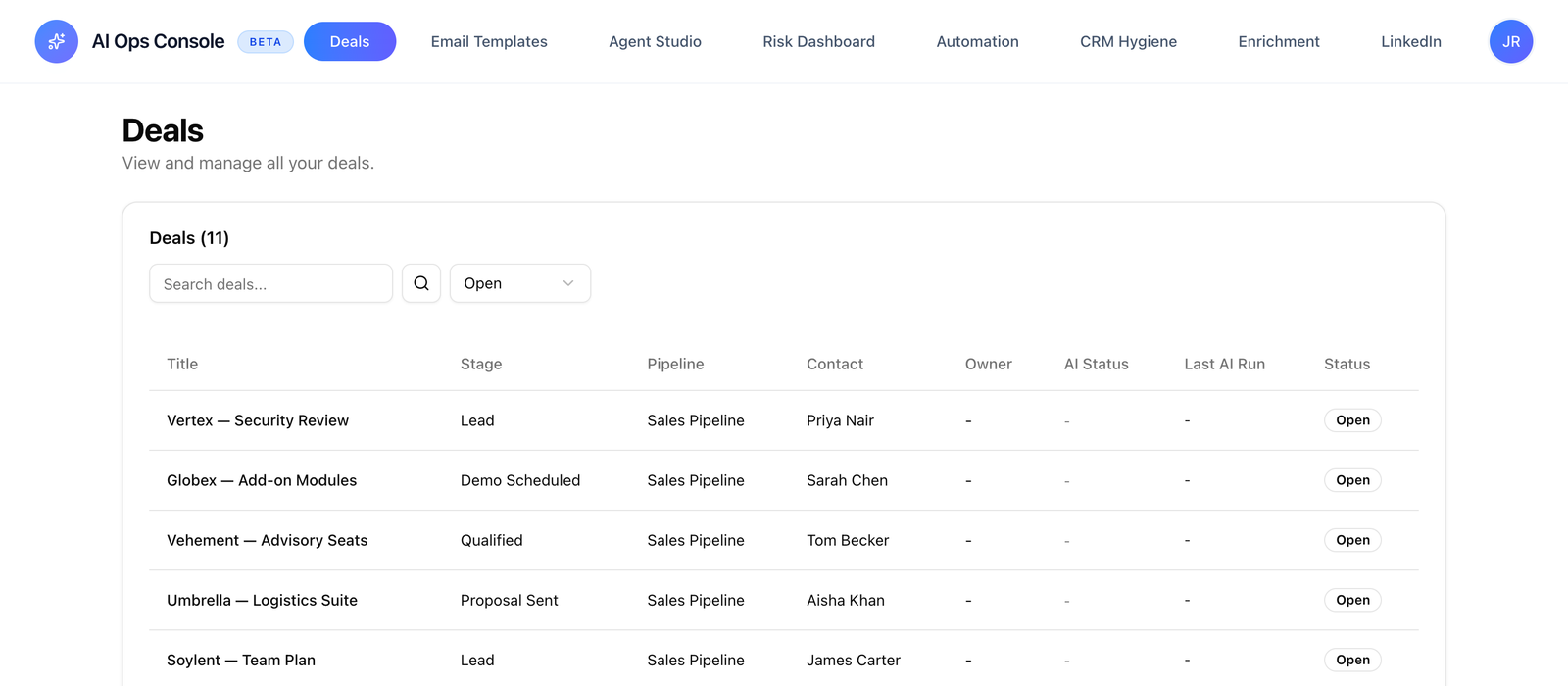
A tour of the main app: pipeline, deal detail, risk feed, inline insights. The screen your team opens before coffee.
Surface
Web app · responsive
Primary user
AE + manager
Inline AI
On every record
Filters
Saved per user
The homepage can’t show enough screen. If your team is the kind that needs to actually see the product before they commit, this is the page.
CHRM’s workspace is built for the closer who has fifteen deals in flight and a Friday review at 4pm. Pipeline view shows every deal with the AI-surfaced state — risk severity, summary excerpt, last touch, next action — without the rep having to click into each one.
Deal detail is the focus.
Click into a deal and the timeline collapses every conversation — calls, emails, LinkedIn touches, CRM notes — into a single reverse-chronological feed. The AI summary sits above it with field-level citations. Open risks are pinned. Stakeholder map is on the right.
Bulk actions where they matter.
Multi-select deals to apply a sequence, reassign ownership, or trigger batch AI re-analysis. Useful for onboarding a new pipeline, applying a process change, or handing deals between reps.
Saved views per user.
Filters are saved per user. The view your VP opens for the Monday forecast and the view your AE opens for their personal pipeline aren’t the same view — and shouldn’t be.
Pipeline viewEvery deal, with AI state inline: risk, summary, next action.
Deal detail timelineEvery conversation, every channel, in one reverse-chrono feed.
Bulk actionsMulti-select for sequence enrollment, reassignment, batch re-analysis.
Saved viewsFilters per user. Manager and AE views aren’t the same view.
CHRM is the execution layer for CRM. After every sales conversation — a call, a demo, an email thread — CHRM fills your CRM fields, generates a personalised follow-up, and flags any deal risks. It sits between your conversations and your CRM. Your closers never log a field. Leadership always has accurate pipeline data.
OAuth, fifteen minutes. You connect your CRM, define which fields CHRM should populate, and link your AI note-taker. From that point every processed conversation flows directly into your CRM. No middleware, no manual steps. No credentials stored on our side.
CHRM currently supports HubSpot and Pipedrive. If Salesforce is your system of record, mention it on the intro call and we'll tell you honestly whether we can support your setup today.
No. CHRM works alongside your existing note-taker. They handle recording and transcription. CHRM takes the transcript and acts on it. If you don't use a note-taker, CHRM can process email threads and manually uploaded notes. Capture and execution are different jobs.
Most teams are fully configured and processing their first calls within one business day. Three steps: connect your CRM, define your field mappings, link your note-taker. We run a 30-minute configuration session with every new team so it works correctly for your exact setup from day one.
Gong and Clari are conversation intelligence. They tell you what's happening in your deals. CHRM acts on it. CHRM doesn't surface insight for humans to act on; it takes the action automatically. Gong is analysis. CHRM is execution. They solve different problems.
Completely. You define the exact fields you want CHRM to populate — custom fields, standard fields, deal stages, contact properties, anything in your HubSpot or Pipedrive. Most teams configure ten to twenty fields per deal record. We don't impose a template.
92–97% field accuracy on well-structured calls. Accuracy depends on conversation quality — calls where deal specifics are explicitly discussed produce near-perfect outputs. When information is ambiguous or not discussed, CHRM leaves the field empty rather than guess.
Five categories: missing decision-maker, budget uncertainty, competitive threat, timeline drift, and champion disengagement. Risk flags are surfaced inside your CRM, not buried in a call recording somewhere.
CHRM processes transcript data to extract structured deal fields and does not store raw conversation audio or video. Transcripts are processed then discarded. Only the extracted structured fields are written to your CRM. We integrate with your CRM and note-taker via OAuth; no credentials are stored on our servers.
Not yet. We're early, and a formal SOC 2 audit is ahead of us, not behind us. What's true today: CHRM connects to your CRM and note-taker over OAuth, stores no credentials, and discards transcripts once the structured fields are extracted. If your security team needs a formal review, ask on the intro call and we'll walk through exactly how we handle data.
$1,000 per AE seat per month. Every other seat — managers, RevOps, leadership — is free. The first thirty days are free for up to five AE seats. We don't do self-serve trials because a 15-minute configuration session is what makes CHRM work correctly from day one.
B2B sales teams with 5–50 account executives. At that scale CRM hygiene is a constant operational problem: large enough to matter for forecasting, small enough that you're not running a dedicated RevOps engineering team. Teams under 5 reps often find the admin manageable. Teams over 50 typically need enterprise CRM architecture we don't currently serve.
Book a call
Stay human. Let AI do the rest.
A twenty-minute call. Then a configured product, the same week. We don’t do self-serve onboarding. A short call lets us configure CHRM to your CRM fields, your deal stages, and the way your team actually works. If we’re not the right fit, we’ll say so before the second call.