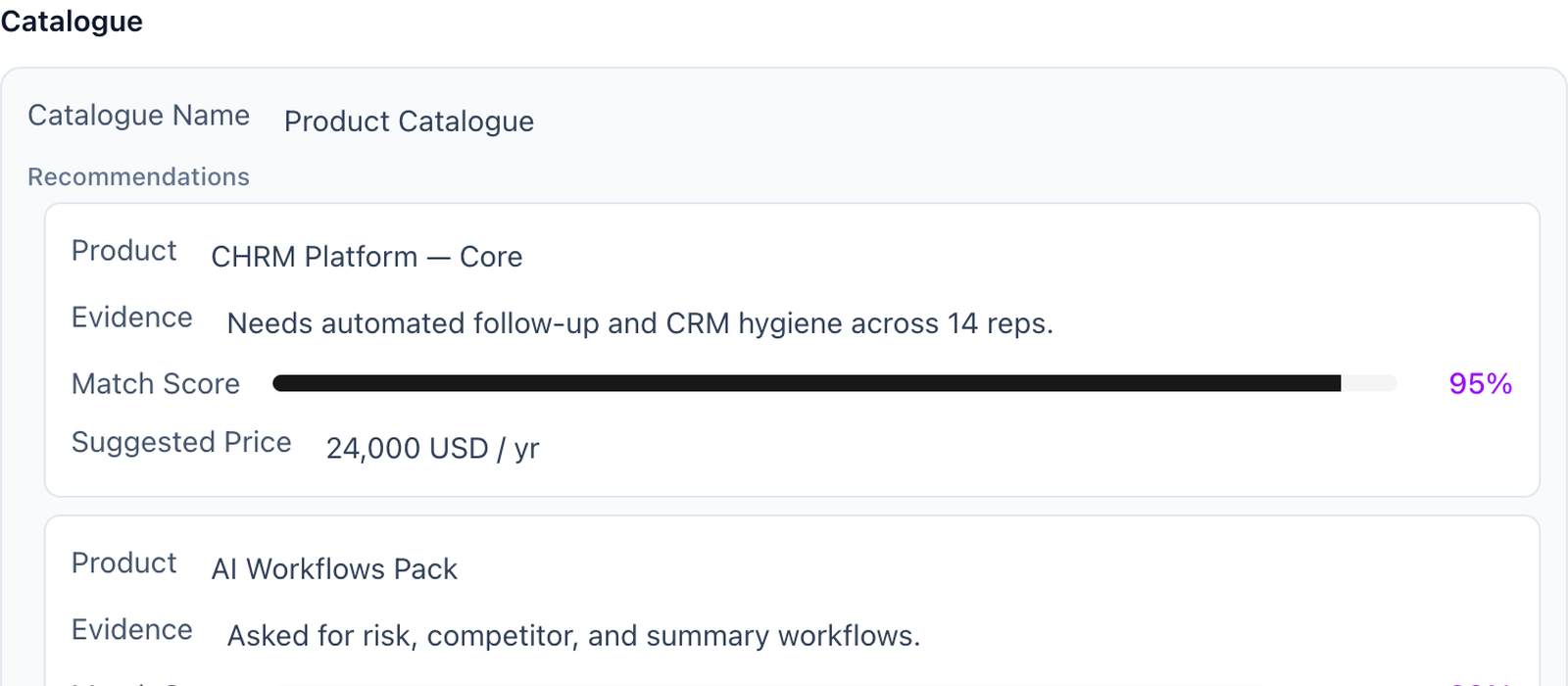
Build your catalogue with the columns you choose. CHRM recommends the right items per deal, with match scores and suggested pricing, grounded in what the prospect actually said.
Catalogue
Custom columns
Recommendations
Per deal
Match scoring
Inline confidence
Best fit
Multi-SKU + configurable products
If your product is one thing with one price, this page isn’t for you. If your product is a catalogue — SKUs, tiers, configurations, packages — recommending the right configuration to each prospect is a real problem, and reps usually get it wrong by defaulting to the package they remember best.
CHRM solves it by reading the conversation. Buyer says they need single sign-on, three-region deployment, and SOC 2 reporting? CHRM recommends the tier that includes them, scores the match, and proposes pricing before the rep has to flip to the price book.
Catalogue, your way.
Build the catalogue with the columns that matter to you. Name, SKU, tier, pricing, included modules, eligibility rules, anything. CHRM reads the table and uses it as ground truth.
Configurable products supported.
For multi-component or configurable products, CHRM recommends the configuration, not just the package. Each component recommendation comes with the buyer signal that motivated it.
Custom catalogue columnsBuild the table with the fields that matter: SKU, tier, modules, pricing, eligibility.
Per-deal recommendationsThe right configuration, scored against the actual conversation.
Signal-cited matchesEvery recommended item links to the buyer signal that produced it.
Suggested pricingPricing proposed inline, ready for the rep to confirm.
CHRMCatalogue · 47 SKUs · recommended for this deal
The right items, scored against the conversation. Pricing proposed inline.
CHRM is the execution layer for CRM. After every sales conversation — a call, a demo, an email thread — CHRM fills your CRM fields, generates a personalised follow-up, and flags any deal risks. It sits between your conversations and your CRM. Your closers never log a field. Leadership always has accurate pipeline data.
OAuth, fifteen minutes. You connect your CRM, define which fields CHRM should populate, and link your AI note-taker. From that point every processed conversation flows directly into your CRM. No middleware, no manual steps. No credentials stored on our side.
CHRM currently supports HubSpot and Pipedrive. If Salesforce is your system of record, mention it on the intro call and we'll tell you honestly whether we can support your setup today.
No. CHRM works alongside your existing note-taker. They handle recording and transcription. CHRM takes the transcript and acts on it. If you don't use a note-taker, CHRM can process email threads and manually uploaded notes. Capture and execution are different jobs.
Most teams are fully configured and processing their first calls within one business day. Three steps: connect your CRM, define your field mappings, link your note-taker. We run a 30-minute configuration session with every new team so it works correctly for your exact setup from day one.
Gong and Clari are conversation intelligence. They tell you what's happening in your deals. CHRM acts on it. CHRM doesn't surface insight for humans to act on; it takes the action automatically. Gong is analysis. CHRM is execution. They solve different problems.
Completely. You define the exact fields you want CHRM to populate — custom fields, standard fields, deal stages, contact properties, anything in your HubSpot or Pipedrive. Most teams configure ten to twenty fields per deal record. We don't impose a template.
92–97% field accuracy on well-structured calls. Accuracy depends on conversation quality — calls where deal specifics are explicitly discussed produce near-perfect outputs. When information is ambiguous or not discussed, CHRM leaves the field empty rather than guess.
Five categories: missing decision-maker, budget uncertainty, competitive threat, timeline drift, and champion disengagement. Risk flags are surfaced inside your CRM, not buried in a call recording somewhere.
CHRM processes transcript data to extract structured deal fields and does not store raw conversation audio or video. Transcripts are processed then discarded. Only the extracted structured fields are written to your CRM. We integrate with your CRM and note-taker via OAuth; no credentials are stored on our servers.
Not yet. We're early, and a formal SOC 2 audit is ahead of us, not behind us. What's true today: CHRM connects to your CRM and note-taker over OAuth, stores no credentials, and discards transcripts once the structured fields are extracted. If your security team needs a formal review, ask on the intro call and we'll walk through exactly how we handle data.
$1,000 per AE seat per month. Every other seat — managers, RevOps, leadership — is free. The first thirty days are free for up to five AE seats. We don't do self-serve trials because a 15-minute configuration session is what makes CHRM work correctly from day one.
B2B sales teams with 5–50 account executives. At that scale CRM hygiene is a constant operational problem: large enough to matter for forecasting, small enough that you're not running a dedicated RevOps engineering team. Teams under 5 reps often find the admin manageable. Teams over 50 typically need enterprise CRM architecture we don't currently serve.
Book a call
Stay human. Let AI do the rest.
A twenty-minute call. Then a configured product, the same week. We don’t do self-serve onboarding. A short call lets us configure CHRM to your CRM fields, your deal stages, and the way your team actually works. If we’re not the right fit, we’ll say so before the second call.